Download a local model and you'll be asked to pick from names like Q8_0, Q6_K and Q4_K_M. Those letters decide how big the file is, how fast it runs and how much quality you give up. They're also why a tiny assembly project like llm.asm can run a model from a 614 MiB file, and why Ring -1 Kernel Surgeon fits a 2B model into 2 GiB.
What is quantization?
A model's weights are just numbers. They're usually trained and shipped as 16-bit values. llama.cpp's quantize guide defines quantization simply: it "reduces the precision of model weights (e.g., from 32-bit floats to 4-bit integers)."
The memory savings are large. Hugging Face's quantization overview gives a rule of thumb: an 8B model needs "about 16GB for its weights in bf16, about 8GB at 8 bits, and about 4–5GB at 4 bits."
How does Q8_0 work?
You can't just round every weight to an 8-bit integer, because weights in different parts of a model have very different sizes. Q8_0 solves this with blocks. Hugging Face's GGUF documentation describes it: "Each block has 32 weights," and each weight is rebuilt as w = q * block_scale.
In practice, take 32 neighbouring weights, find the largest, and choose a scale so that weight maps to 127. Store the 32 rounded integers plus the one scale. The cost is a little over 8 bits per weight. llama.cpp's table puts Q8_0 at 8.5 bits per weight.
llm.asm's weight converter does exactly this in about 30 lines of Python. It clips to the range −127 to 127 and stores each block's scale as a 16-bit float. Its assembly then multiplies those 8-bit integers directly with AVX2 instructions.
What do Q4_K and Q4_K_M mean?
The "K" marks llama.cpp's k-quants, a newer family. Instead of one flat list of blocks, they group blocks into super-blocks. Hugging Face's table describes Q4_K as "Super-blocks with 8 blocks, each block has 32 weights." Each block gets its own 6-bit scale and 6-bit minimum, "resulting in 4.5 bits-per-weight."
The suffix (_S, _M) marks a size variant. llama.cpp's quantize tool mixes types across a model by default: its --pure flag exists to "disable k-quant mixtures." That's why Q4_K_M averages 4.89 bits per weight on Llama 3.1 8B rather than a flat 4.5. Some tensors are kept at higher precision. llama.cpp's README doesn't spell out exactly which ones.
How much do you gain in size and speed?
llama.cpp's README includes a table for Meta's Llama 3.1 8B:
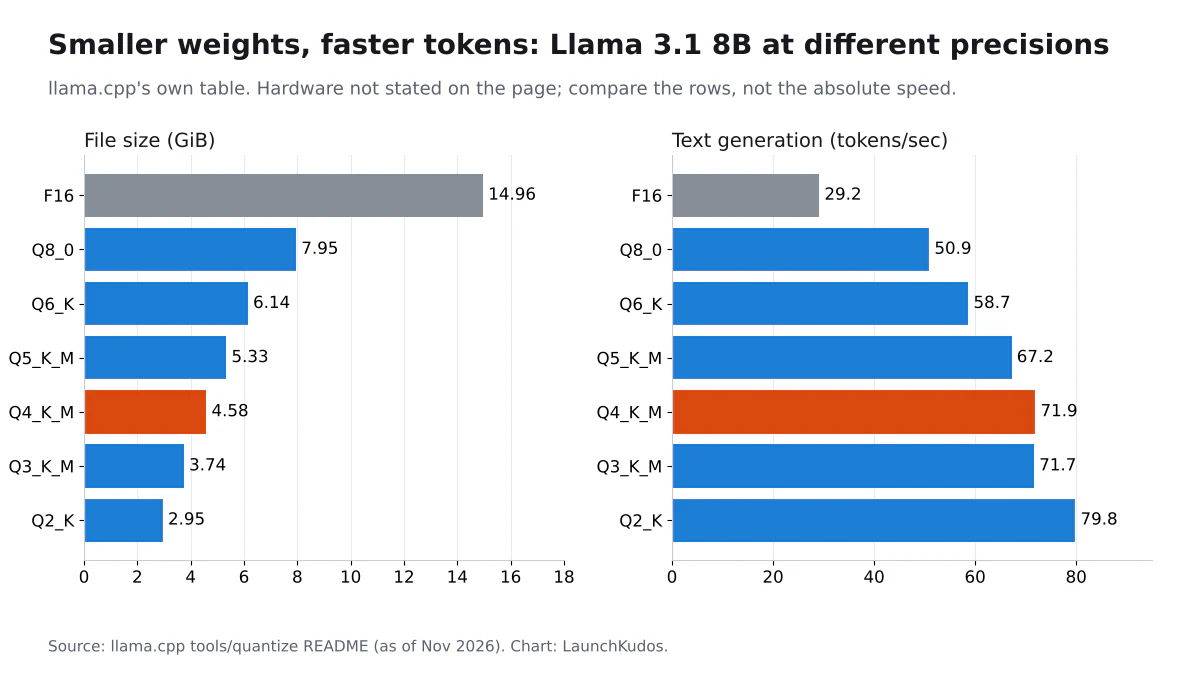
| Type | Bits per weight | Size (GiB) | Generation (tokens/sec) |
|---|---|---|---|
| F16 | 16.00 | 14.96 | 29.17 |
| Q8_0 | 8.50 | 7.95 | 50.93 |
| Q6_K | 6.56 | 6.14 | 58.67 |
| Q4_K_M | 4.89 | 4.58 | 71.93 |
| Q2_K | 3.16 | 2.95 | 79.85 |
The README doesn't say what hardware produced the speeds, so compare rows rather than reading them as absolute numbers. At larger scales the same README gives Llama 3.1 70B as 280.9 GB originally against 43.1 GB in Q4_K_M.
Why does a smaller file run faster?
Generating text one token at a time means streaming the model's weights through the processor for every token. NVIDIA's inference guide puts it plainly: "Model execution is frequently memory-bandwidth bound." It calls the generation step "a memory-bound operation." Halve the bytes and, in that bound, you roughly halve the time spent waiting on memory. In llama.cpp's table, Q8_0 generates about 75% faster than F16.
Reading prompts is different. That work is more compute-heavy, and in the same table prompt speed barely changes between types. We cover why in our prefill vs decode explainer.
What do you give up?
Accuracy, by a little or a lot. llama.cpp says the loss "is usually measured in" perplexity (how surprised the model is by real text) or KL divergence (how far its predictions drift from the original). It also says the loss can be reduced with an "imatrix" file that tells the tool which weights matter most.
Research has pushed lower bit widths:
- LLM.int8() (2022, arXiv) kept outlier features in 16-bit and the rest in 8-bit, cutting inference memory "by half while retaining full precision performance."
- GPTQ (2022, arXiv) used "approximate second-order information" to reach 3 or 4 bits per weight.
- AWQ (2023, arXiv) found that "protecting only 1% salient weights can greatly reduce quantization error."
What is GGUF?
GGUF is the file format these quantized models ship in. Its specification calls it "a file format for storing models for inference with GGML," designed for "fast loading and saving." A GGUF file holds the weights plus metadata such as the architecture and tokenizer, so one file is enough to run the model. Each tensor records its own quantization type, which is how one file can mix Q4_K and Q6_K.
FAQ
What does Q4_K_M mean?
A 4-bit "k-quant" format from llama.cpp, in its _M variant. Weights are stored in blocks of 32 inside super-blocks, with 6-bit scales. Some tensors are kept at higher precision, averaging about 4.9 bits per weight on Llama 3.1 8B.
Is Q8_0 better than Q4_K_M?
It's closer to the original model but about 74% larger. On llama.cpp's Llama 3.1 8B table it was also slower at generating text (50.9 vs 71.9 tokens/sec).
Which quantization should I download?
It depends on your memory. Pick the largest that fits comfortably alongside your context. Q4_K_M is a common middle ground, and Q8_0 suits you if you have room.
Does quantization make a model dumber?
Somewhat, and the loss grows as bits drop. llama.cpp measures it with perplexity and KL divergence. It can be reduced with an importance matrix.
What is GGUF?
The single-file model format used by llama.cpp and GGML-based tools. It stores quantized weights plus the metadata needed to run them.
Reader poll
Which quantization do you usually run?
Vote to see results.
- #quantization
- #gguf
- #llama-cpp
- #local-llm
- #explainer