Two projects this year booted a PC straight into a language model with no operating system. llm.asm did it with a 24 KB kernel loaded by GRUB. NightRun did it as a UEFI app that never leaves the firmware. To see why they're built so differently, you need the steps every PC goes through before an operating system runs.
What does the firmware do?
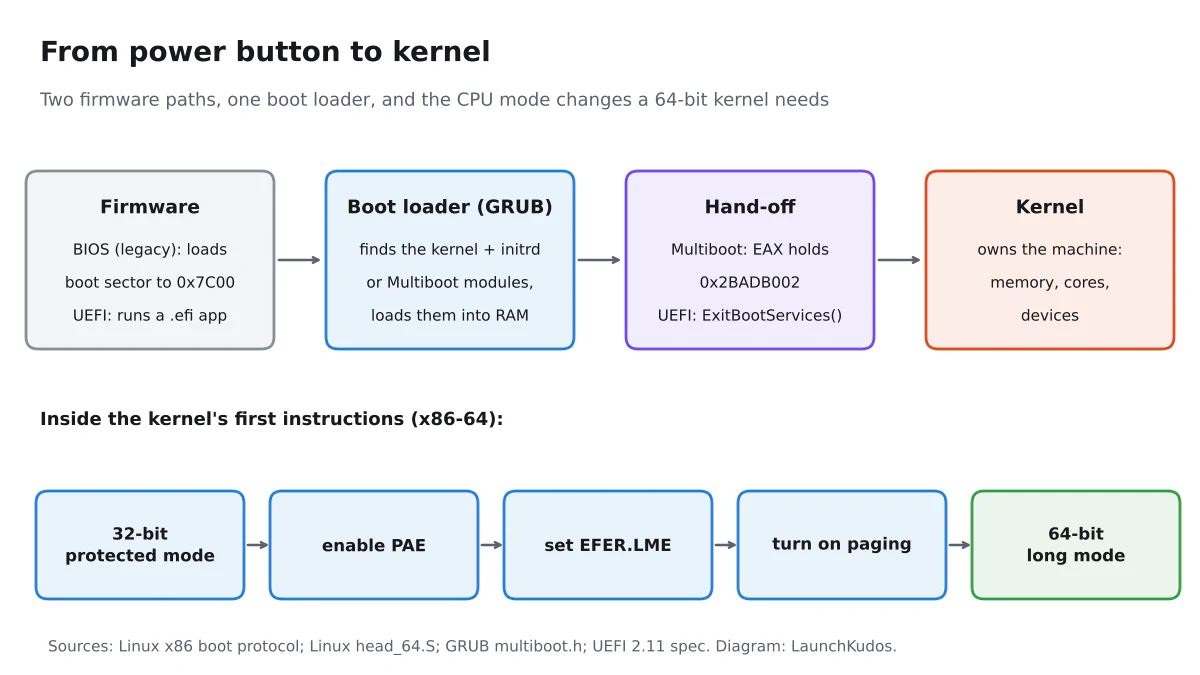
Firmware is the code stored on the motherboard that runs when power comes on. On older PCs it's the BIOS. The Linux x86 boot protocol still documents the classic layout, where the BIOS loads the first sector of the disk to the "boot sector entry point 0000:7C00" and jumps to it. The same document admits Linux "uses a rather complicated boot convention," partly for compatibility with that 1980s design.
Modern PCs use UEFI. The UEFI Forum, an industry body with "more than 250 member companies," maintains its specification. The latest version, per the Forum's specifications page, is 2.11, released in December 2024. UEFI firmware doesn't run a 512-byte boot sector. It runs a full program, which the spec calls an "OS loader."
What are UEFI boot services?
While the firmware is in charge, it offers boot services: functions for reading disks, drawing on screen, reading the keyboard and allocating memory. Then comes a one-way door. The UEFI spec's boot services chapter says ExitBootServices() is meant for the operating system "to indicate that its loader is ready to assume control of the platform." After that, only a small set of runtime services remains.
This is the key design difference between the two LLM projects. NightRun deliberately never calls ExitBootServices(). It keeps using the firmware for keyboard, screen and disk, which makes it portable but means firmware code is still running underneath. llm.asm takes the opposite route: once loaded, it drives the hardware itself.
What does a boot loader like GRUB do?
A boot loader bridges the firmware and the kernel. It finds the kernel file, loads it and any companion files into memory, fills in the information the kernel needs (how much memory there is, the command line), and jumps to the kernel's entry point.
GRUB is the most common one on Linux. The kernel's boot protocol even lists it by ID number, "0x7 / GRUB," among the boot loaders it recognises. For Linux, GRUB loads the kernel and an initial RAM disk (initrd), and the kernel image identifies itself with the magic number "HdrS."
What is Multiboot?
Multiboot is a shared contract between boot loaders and kernels, so a hobby or research kernel doesn't have to write its own loader. GRUB's multiboot.h defines the two numbers involved:
0x1BADB002: the kernel puts this near the start of its file so the boot loader recognises it as Multiboot-compatible.0x2BADB002: the boot loader puts this in the EAX register when it jumps to the kernel, so the kernel knows who started it.
Multiboot also lets the boot loader pass extra files, called "modules." llm.asm uses one to deliver its 614 MiB model. GRUB loads the 24 KB kernel and the model file, and the kernel finds the model in memory and uses it where it sits. Ring -1 Kernel Surgeon uses the newer Multiboot2 to receive a whole Linux kernel and its initrd as modules, then boots Linux itself.
How does a kernel get into 64-bit mode?
A Multiboot kernel starts in 32-bit protected mode. To run 64-bit code, it has to switch the CPU into long mode. The Linux kernel's own startup code, head_64.S, shows the order in comments:
- "Make sure cpu supports long mode."
- "Enable PAE mode": turn on the larger page-table format.
- "Enable Long mode in EFER": set a bit in a model-specific register called EFER.
- "Enter paged protected Mode, activating Long Mode": switch on paging. The CPU is now in long mode, then a far jump moves it into 64-bit code.
llm.asm's boot.asm does the same in about 400 lines. It builds page tables covering the first 4 GiB using 2 MiB pages, enables PAE, EFER.LME and paging, then checks the CPU has the AVX2 vector instructions it needs before starting the model.
Where does Secure Boot fit?
Secure Boot is a UEFI feature that refuses to run unsigned boot software. In Microsoft's description, "the firmware checks the signature of each piece of boot software" before running it. Microsoft's page also notes that its original Secure Boot certificates from 2011 "begin expiring in June 2026," and describes how they are being replaced.
Experimental boot code like NightRun or llm.asm isn't signed, so it needs Secure Boot switched off.
FAQ
What's the difference between BIOS and UEFI?
BIOS is the older firmware design that loads a 512-byte boot sector to address 0x7C00. UEFI is its modern replacement, maintained by the UEFI Forum. It runs full programs and offers services such as disk and screen access until the OS takes over.
What does GRUB do?
It loads the operating system kernel and any companion files into memory, passes along information such as the memory map and command line, and jumps to the kernel.
What is Multiboot?
A standard hand-off between boot loaders and kernels. A kernel marks itself with 0x1BADB002, and the boot loader starts it with 0x2BADB002 in the EAX register, plus a table describing memory and any loaded modules.
What is ExitBootServices()?
The UEFI call an OS loader makes to take control of the machine from the firmware. After it, most firmware services are no longer available.
What is long mode?
The x86-64 CPU's 64-bit mode. A kernel enters it by enabling PAE, setting the LME bit in the EFER register, and turning on paging.
Reader poll
What does your main PC boot with?
Vote to see results.
- #boot
- #uefi
- #grub
- #linux
- #explainer